Argeebeedle: Worlde and RGB colours had a kid
First issued on 13/10/2025
I created a game I can't beat, give it a try...
Gamer one day, gamer every day
I am an avid player of Wordle, and all of its variants (as a musician, special mention to Bandle). Playing video games, solving riddles, puzzles etc is one of my core components, so I wanted to create a Wordle-like game, but I didn't know what to base it on, e.g. shall I make people guess a movie title, a music note, a celebrity, etc?
And then I thought about colours, there are many (many) ways to represent colours, the two most common ones are:
- by the hexadecimal value (HEX):
#1ecbe1is yellow-ish - by the RGB value (RGB):
(3, 94, 252)is blue-ish
The latter retained my attention for the following reasons:
- the 3 values represent the amount of red, green and blue in the colour, that value varies from 0 (none) to 255 (100%)
- the name RGB stands for Red, Green and Blue, so there is no to little effort to map the numbers to the colours, e.g. (1 ,2 ,3) means red is 1, green is 2 and blue is 3
- it is based on the additive color model, it is a fancy name, but it just boils down to the colour painting we mix when we are in primary school: mixing equally a bit of red and green painting will give a yellow mixtures, blue and red will give purple, etc etc
It is then fairly intuitive for a non-technical person to understand the RGB system:
(255, 0, 0)is probably quite red(0, 255, 0)is probably quite green(0, 0, 255)is probably quite blue(250, 250, 0)is probably something yellow-ish(250, 0, 250)is probably something purple-ish- etc
The only edge cases that might be tricky to know are:
(0, 0, 0)is black(255, 255, 255)is white
So the idea would be: display a colour, make the user guess the RGB value of the colour, and set the Wordle structure accordingly (6 guesses, feedback after a guess, leaderboard etc).
Then I prospected what already existed...
"But it's already done, so you can't do it again"
Nah, don't ever let anyone saying that to you:
- you can always come up with something better, with a better UX/UI, better performances etc
- add new features/ideas that the previous people didn't think of
- don't underestimate the learning path, you will have to learn and solve the problems that the previous versions had to face, but you might come up with something smarter
- innovation comes with iteration, again, from the previous versions you can come up with something innovative
- tools and frameworks evolve, the previous versions might not have had some technos available to them at their points in time
Having said that, the existing wordle-clones are pretty good! With good names as well:
Following my own piece of advice, I decided to carry one and create "RGB-dle", or (if you haven't figured it out yet) "Argeebeedle"!
Game logic
The layout is the following:
- a box with the colour to guess
- a submit button of the colour of the current guess
- 3 sliders: red, green and blue
- the guesses matrix
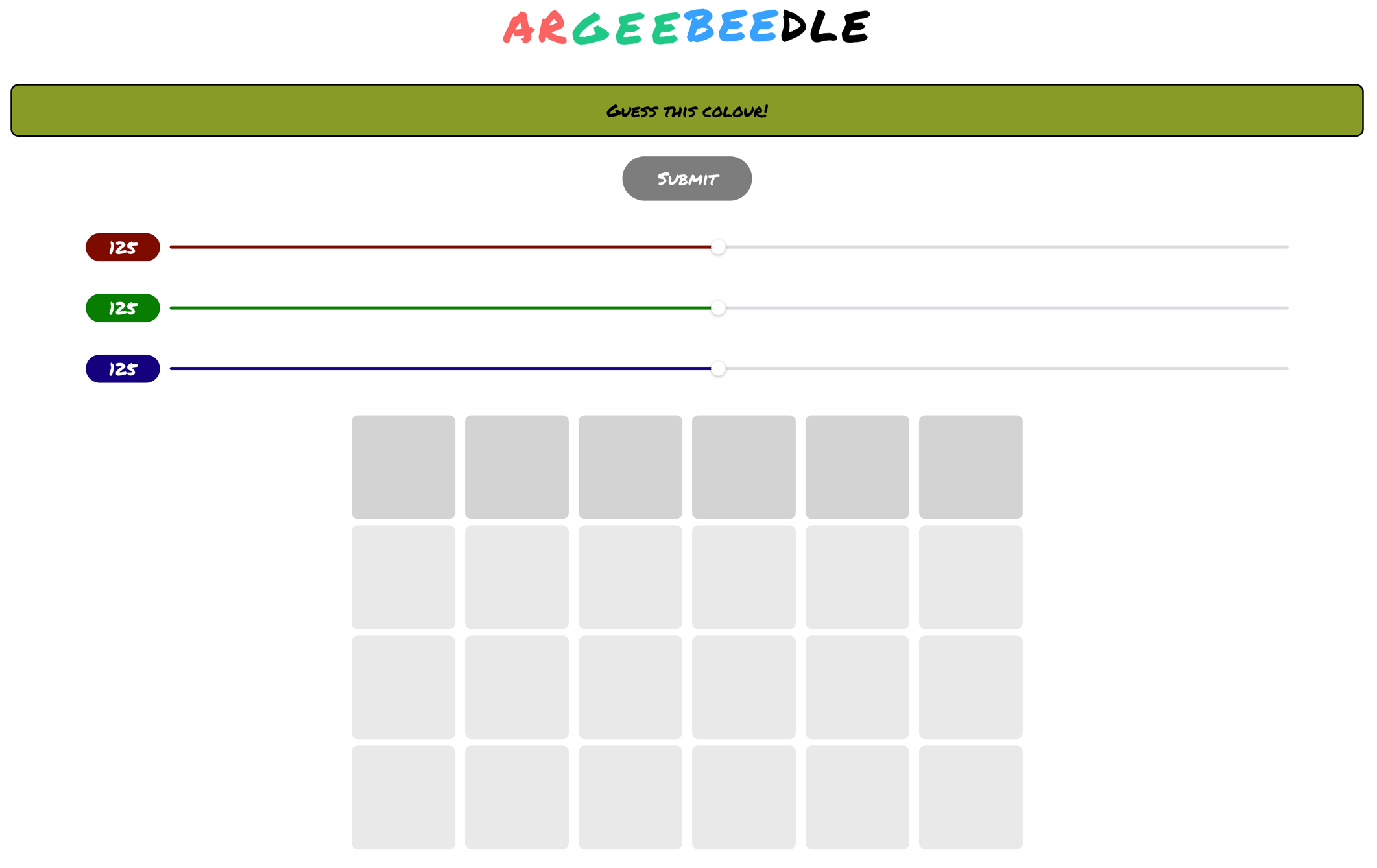
Colour to guess box
It needed to be very obvious that it was the colour to guess, so I made it long and stretch.
Submit button
The colour of that button is the colour of current guess, for example:
- if the sliders are set as
RGB(255, 0, 0), then the submit button is red - if the sliders are set as
RGB(0, 255, 0), then the submit button is green - if the sliders are set as
RGB(0, 0, 255), then the submit button is blue - etc
The intentional layout of having the submit button just below the guess box is help the user to try matching their guessing colour to the colour of the day.
Sliders
It was my very initial intention to use sliders, as most of the games and webapp are used on mobile nowadays, I didn't want something messy with a user manually inputting the numbers or some awkward button to increase/decrease the value or some digit pads.
Each slider goes from 0 to 255, and they change colour as the user moves the slider.
Once a slider is moved, 2 paint brushes are displayed around the submit button to indicate that the colour change was taken into account.
Guesses matrix
The guesses matrix was the most challenging part of the game to design in term of UI/UX.
Once the user submits a guess, the guess is displayed in the matrix, in a column orientation:
- the guessed colour
- the RGB values with indication of how close the value is from the target:
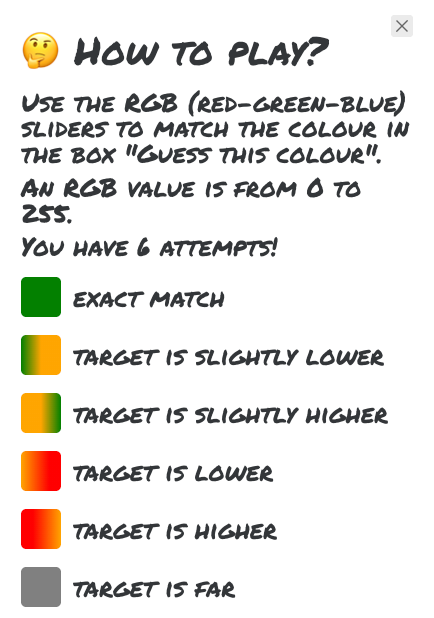
- grey: the guessed value is far
- red on the left/orange on the right: the target value is higher
- red on the right/orange on the left: the target value is lower
- orange on the left/green on the right: the target value is slightly higher
- green on the left/orange on the right: the target value is slightly lower
- green: the guessed value is exactly the target value
The values to be considered "far", "higher" and "lower" are not disclosed to the user to keep things simple and intuitive.
The user can see that scoring system on the tutorial modal:
I chose that approach with that scale of colour for a couple of reasons:
- it is a bit more intuitive than having some numbers and percentages
- it stays in the theme of colour
End game
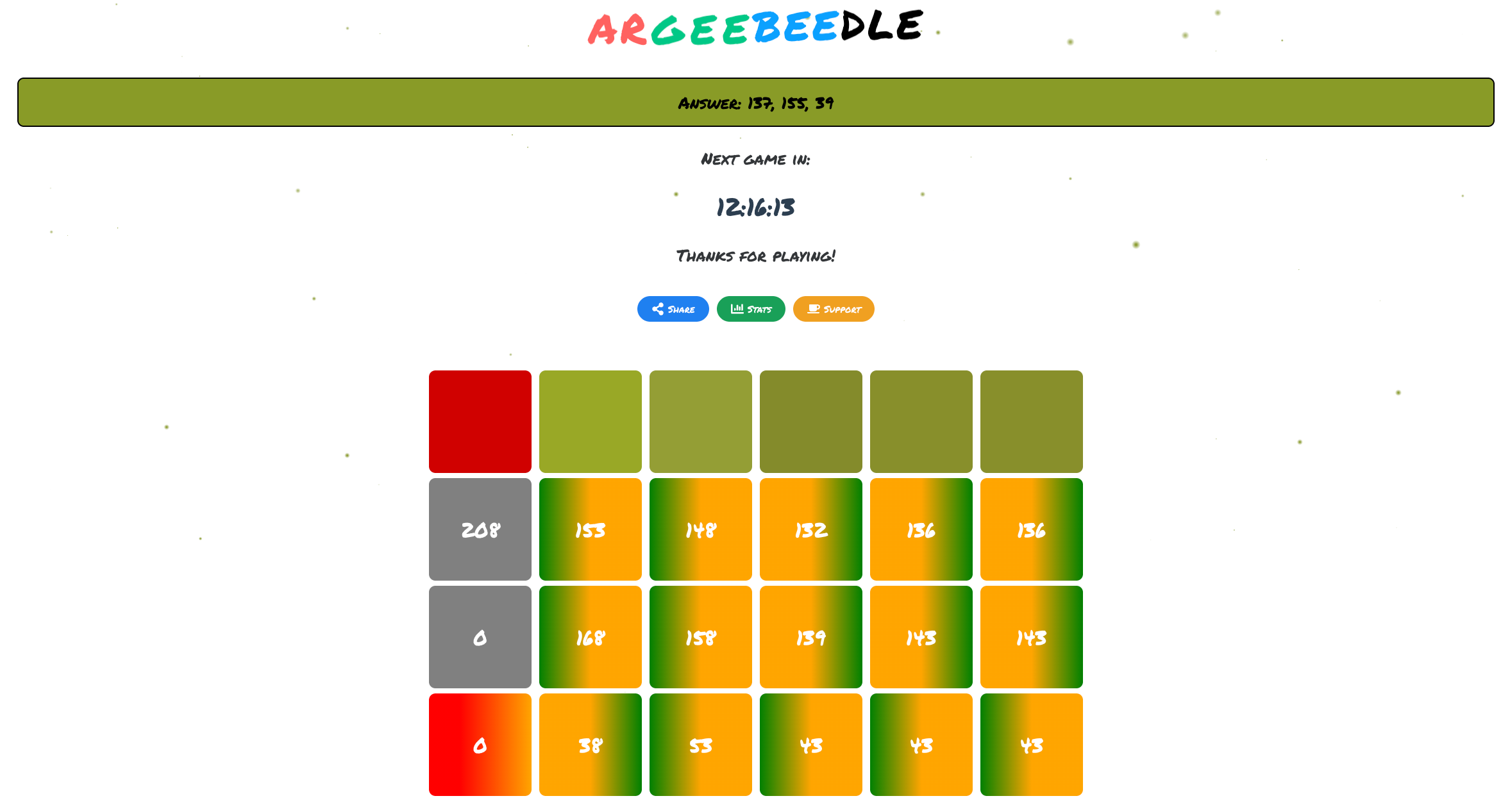
Once the users have exhausted all their guesses, the game is over, the RGB value of the target is revealed, and there is a countdown for the next colour.
I also added a wordle-style share button:
ARGEEBEEDLE
2025-10-17 X/6
⚪️⚪️🔴
🟡🟡🟡
🟡🟡🟡
🟡🟡🟡
🟡🟡🟡
🟡🟡🟡
https://hervit0.github.io/argeebeedle/
Bonus: I added some ascending bubbles that are of the colour of the target.
Technical considerations
Front-end technology
Vue 3 was my first choice, as it's a great popular front-end framework, with a strong ecosystem:
No need for a server
At the time of writing, the application doesn't need a backend server, the webapp just use a simple local store to store users data (guesses, stats, etc).